
ABB Robot Maintenance for IRC5 Cabinet Dust
A practical ABB IRC5 cabinet inspection process for identifying dust contamination, airflow restrictions, connector risks, and appropriate corrective action.
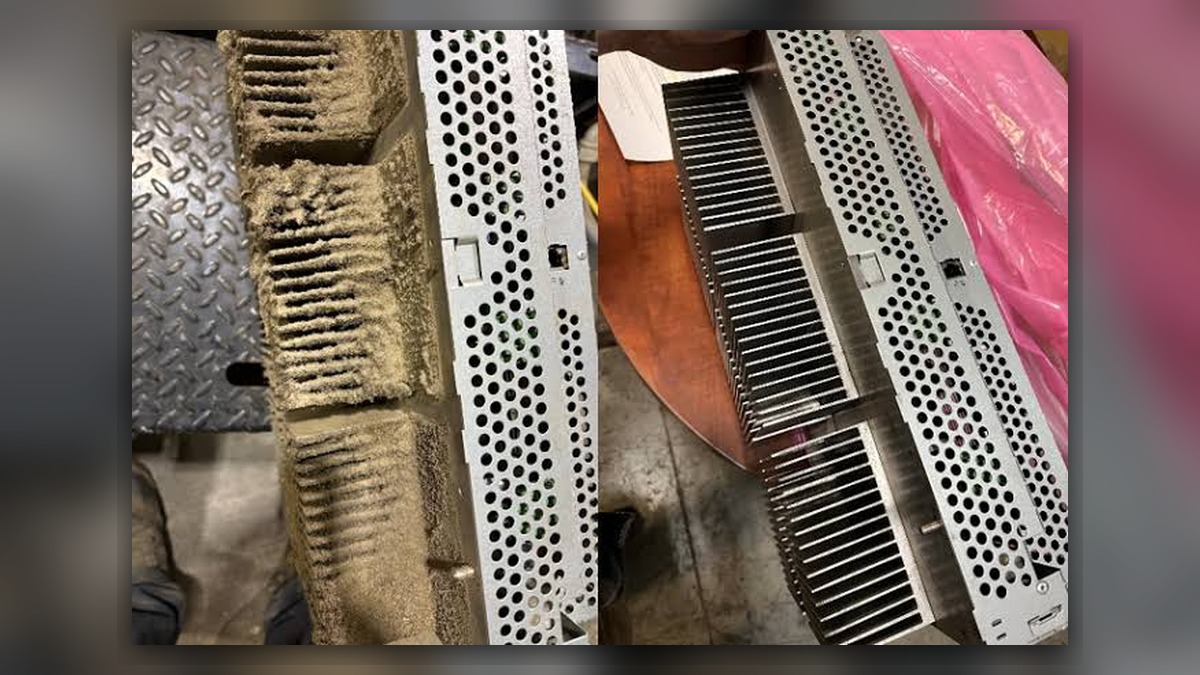
Dust inside an ABB IRC5 controller should be addressed through planned ABB robot maintenance before it contributes to restricted airflow, contaminated electrical connections, or unreliable cooling. Record any alarms, operating conditions, controller identity, and visible contamination before disturbing the cabinet. Dust alone does not prove that a fan, drive unit, power supply, or circuit board is damaged. The inspection must distinguish a housekeeping issue from airflow obstruction, conductive contamination, connector deterioration, or an existing component fault.
Symptoms and Scope
This article applies to ABB robot systems using an IRC5 controller where dust is visible around air inlets, filters, fans, internal surfaces, cable entries, or electrical modules. It focuses on contamination assessment during a controlled maintenance stop. It does not provide instructions for energized electrical testing, circuit-board repair, safety-system adjustment, or parameter modification.
Possible warning signs include visibly loaded filters, dust deposits near ventilation paths, recurring cabinet temperature warnings, unusual fan noise, or contamination entering through an unsealed cable opening. These observations justify inspection, but none independently confirms a defective electronic module. A temperature alarm may also involve ambient conditions, inadequate clearance, failed cooling hardware, or another issue that must be identified from the complete alarm history.
Information to Record First
Preserve evidence before cleaning because the location and pattern of contamination can help identify its entry path. Photograph the cabinet exterior, ventilation openings, filters, cable entries, fans, and affected internal areas without touching exposed components.
Complete alarm code and full text:
Date and exact time:
Faulted axis:
Robot position/posture:
Program step or motion:
Actual speed and load condition:
Reset result:
Time until recurrence:
Related power, communication or feedback alarms:
Also record the robot model, IRC5 controller variant, serial information, installed options, cabinet location, recent maintenance work, and nearby sources of dust or airborne process residue. Note whether doors, covers, seals, or cable-entry plates appear missing, loose, or modified.
Safety and Preparation
Cabinet inspection must follow ABB documentation for the installed controller and the facility's electrical safety procedure. Isolate hazardous energy, secure the robot against unintended movement, and observe the required discharge and verification procedures before accessing internal equipment. Only competent personnel should open or service the controller.
Do not use uncontrolled compressed air to redistribute contamination across circuit boards, connectors, or the work area. Do not disconnect cables merely to improve access unless identification, isolation, handling, and reconnection requirements are understood. Cleaning methods must be suitable for electrical equipment and for the type of residue present.
ABB Robot Maintenance Diagnostic Sequence
Begin with the environment. Inspect the area around the controller for grinding dust, welding residue, packaging fibers, oil mist, or material generated by the production process. Check whether ventilation openings have adequate clearance and whether another machine is exhausting contaminated air toward the cabinet. If contamination is concentrated at one opening, investigate that entry path before cleaning the interior.
Next, inspect external filters, grilles, doors, seals, and cable entries. The inspection target is any restriction, gap, damage, or incorrect fit that could impair airflow or allow unfiltered air into the enclosure. A loaded filter may require replacement with the correct specification, but the underlying environmental source should still be addressed. Match replacement items to the controller variant and installed cabinet configuration.
Review the controller event log and maintenance history. Determine whether temperature, fan, power, drive, communication, or feedback events occurred before the inspection. An earlier alarm may redirect diagnosis toward a specific cooling device, supply circuit, connection, or module. Repeated resets should not be treated as proof that contamination was the sole cause.
With the system safely isolated, examine accessible ventilation paths and internal surfaces for deposit patterns, blocked heat-transfer areas, loose debris, corrosion, discoloration, or evidence of moisture. Do not remove modules or disturb connectors without an applicable service procedure. Residue that appears oily, metallic, corrosive, or moisture-bound requires more cautious evaluation than ordinary dry dust because its electrical behavior and cleaning requirements may differ.
How to Distinguish Similar Causes
Uniform dry dust on filters and nearby surfaces generally points toward environmental loading and overdue filter attention. Heavy deposits beyond a damaged seal or open cable entry suggest an enclosure-integrity problem. Localized discoloration, odor, melted insulation, or heat damage is not a routine cleaning condition and should trigger component-level inspection.
If a cabinet temperature event remains after airflow restrictions and environmental conditions have been addressed, evaluate the applicable fan, cooling path, temperature monitoring, and related power connections according to the controller documentation. If communication or axis feedback alarms are present, preserve their full sequence instead of assuming dust caused them. Cable, connector, drive, power, and feedback-related faults require separate evidence.
When Repair or Replacement May Be Considered
Professional inspection may be appropriate when contamination has entered electronic modules, residue cannot be safely identified, corrosion is visible, a fan does not operate as specified, or alarms continue after approved maintenance. An ABB IRC5 controller inspection and repair service is described at https://autonews.best/products/abb-irc5-kong-zhi-gui-yu-ji-xiu.
Any replacement fan, filter, module, or cable must match the exact part number, hardware revision, electrical rating, connector layout, and controller configuration. Visible dust is not sufficient justification for replacing a drive unit or control board.
Verification After Maintenance
Before restoring power, confirm that tools and cleaning materials have been removed, protective covers are installed, connectors disturbed during authorized work are secure, and cabinet doors, seals, filters, and cable entries are correctly fitted. Review the maintenance record and ensure that no safety device or configuration was altered unintentionally.
Restart and functional verification must follow ABB operating information and the site's approved procedure. Check startup status, cooling operation, event logs, and relevant robot functions. Observation under motion may be performed only by suitably competent personnel under controlled conditions. Do not recreate a hazardous operating condition simply to reproduce an earlier symptom.
Information Required for a Repair Inquiry
For an inspection or industrial robot repair service inquiry, provide the robot model, controller model, complete alarm code, alarm history, affected component label, fault conditions, and clear photographs of contamination, filters, cable entries, and component labels. ZHB is an independent industrial robot inspection, repair, and maintenance service provider that also supplies parts to overseas customers. Broader service information is available at https://autonews.best/services.
Conclusion
Effective ABB robot maintenance for cabinet dust begins with evidence preservation, environmental inspection, safe isolation, and contamination classification. Cleaning should not replace diagnosis when alarms, heat damage, corrosion, or component abnormalities are present. Correcting the contamination source, preserving enclosure integrity, using configuration-matched parts, and documenting restart verification provide a more reliable result than replacing components based on appearance alone.