
ABB Robot Controller Repair Process: IRC5 Startup, Drive, I/O, and Safety Loop Troubleshooting
ABB IRC5 controller repair should follow the sequence of checking power supply, main computer, internal bus, drive unit, I/O, and safety loop, while preserving complete fault evidence.
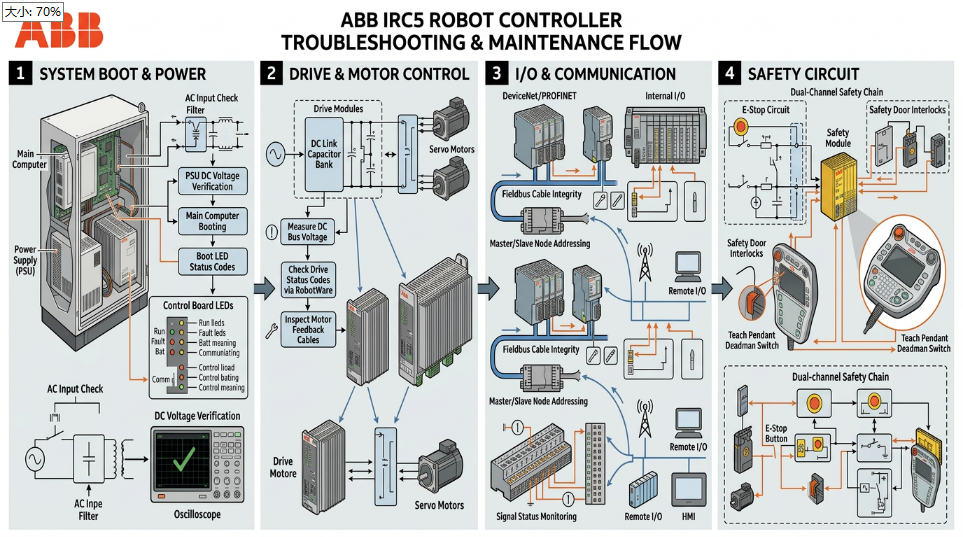
When an IRC5 controller fails to start, cannot enable the drive, or experiences random production stops, first determine whether the fault lies in the power input, computer startup, internal communication, drive system, I/O, or safety loop. Troubleshooting along the signal chain is more effective for preserving valid evidence than repeatedly restarting.
- Power and Startup Status
Check the main power, control power, 24V circuit, circuit breakers, contactors, and cabinet power indicators. Confirm whether the fault is a complete loss of power, the computer not starting, or a specific module not becoming ready after system startup.
- Main Computer and Internal Communication
Record the startup screen, event logs, and system version. Check the main computer, axis computer, storage media, and internal network connections. Communication alarms should be analyzed in conjunction with the affected modules and the sequence of occurrence.
- Drive and Motor Circuit
Verify drive unit alarms, DC bus, enable conditions, motor power cables, and encoder feedback. The troubleshooting approach differs for a single-axis fault versus multiple axes failing simultaneously. For multiple axis anomalies, also check the common power supply and communication links.
- I/O and Safety Loop
Check safety gates, emergency stops, enabling devices, external stops, and peripheral equipment permission signals. Do not judge production faults by shorting the safety loop; instead, confirm inputs, outputs, and safety status point-by-point according to the electrical diagrams.
- Backup and Verification
Before replacing the main computer, axis computer, or drive module, save system backups, parameters, and zero-point data. After repair, complete verification of startup, manual operation, automatic cycles, safety functions, and continuous operation.
The key to IRC5 controller repair is preserving event logs and locating faults according to the system hierarchy, avoiding the replacement of multiple components without basis due to a single alarm.
Industrial Robot Repair Hotline: +86 18122009539
Contact Repair Engineer: +86 18122009539