
ABB Teach Pendant Repair for Unresponsive Hard Keys
Diagnose unresponsive ABB teach pendant hard keys by checking operating context, physical condition, connections, and repeatable input behavior.
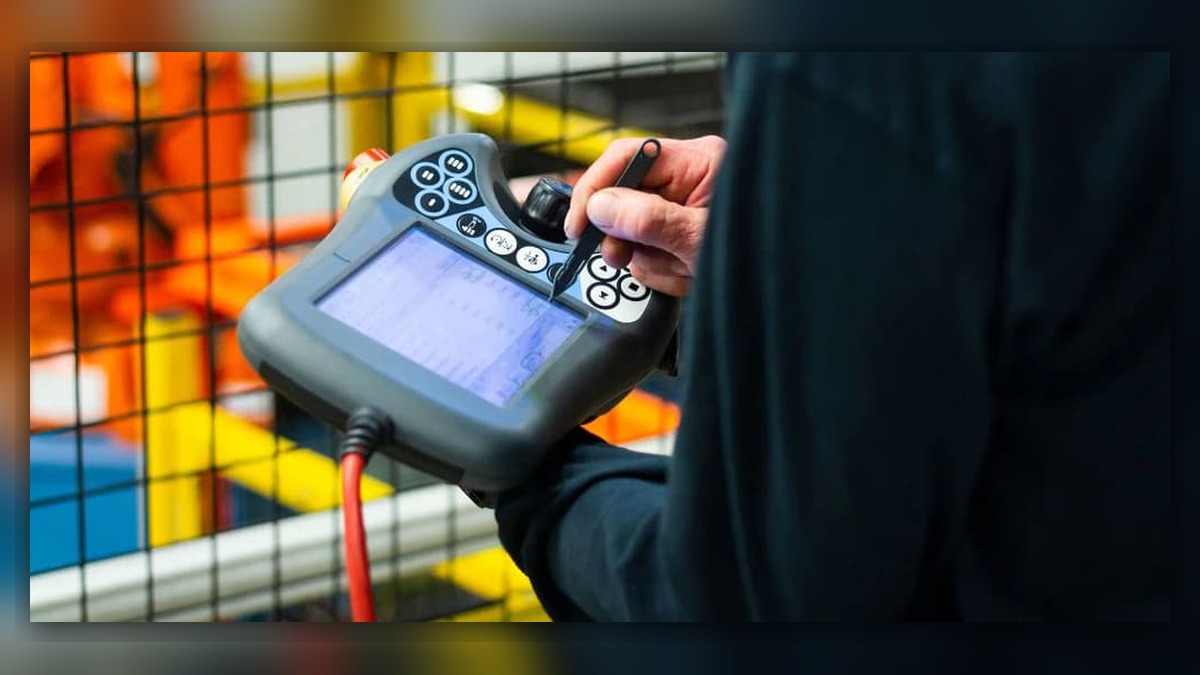
ABB teach pendant repair for unresponsive hard keys should begin by identifying exactly which controls fail, when the problem occurs, and whether the controller records any related event. Potentially involved areas include the key mechanism, pendant electronics, connecting cable, controller interface, and software operating context. Record the pendant and controller identifiers before testing. A key that produces no visible response does not independently prove that the keypad or pendant is damaged because the selected screen, operating mode, access level, or active function may not accept that input.
Symptoms and Equipment Scope
This diagnostic approach applies to ABB robot teach pendants that have physical function, navigation, or command keys. The exact key arrangement, permitted functions, cable interface, and diagnostic options depend on the installed pendant, controller, system software, and application configuration.
The scope is limited to physical keys that are unresponsive, inconsistent, mechanically stuck, or difficult to operate. It does not cover touchscreen-only faults, joystick response problems, enabling-device faults, emergency-stop faults, or a completely blank display. Those symptoms require different diagnostic branches.
Information to Record First
Determine whether one key, one group of adjacent keys, or all physical keys are affected. Note whether the key feels normal, remains depressed, requires unusual force, or works only when pressed at a particular angle. Record whether the failure is constant or appears after warm-up, handling, cleaning, or movement of the pendant cable.
Complete alarm code and full text: Record every related controller event without abbreviation.
Date and exact time: Record when the input failure was observed.
Faulted axis: State whether an axis was involved or mark it as not applicable.
Robot position/posture: Record the robot posture if the problem occurred during operation.
Program step or motion: Identify the active screen, instruction, or operation.
Actual speed and load condition: Record these details if motion was active.
Reset result: State whether the input returned after a permitted reset.
Time until recurrence: Record whether the fault was immediate or intermittent.
Related power, communication or feedback alarms: Include any events occurring before or with the symptom.
Also photograph the complete pendant, product label, affected keys, cable entry, and connector condition. Do not rely on a handwritten model description when a readable label is available.
Safety and Preparation
Place the robot in a safe condition under the site lockout, access-control, and robot safety procedures before inspecting connections or visible damage. Do not use a malfunctioning key to initiate or control hazardous motion. Any functional observation involving robot motion must be performed only by suitably competent personnel under controlled conditions and in accordance with ABB operating information and the site safety procedure.
Do not repeatedly bend the cable, strike the housing, force a stuck key, apply uncontrolled cleaning fluid, or open the pendant to reproduce the problem. These actions can increase damage and obscure the original failure evidence.
ABB Teach Pendant Repair Diagnostic Sequence
1. Confirm the operating context. Record the active screen, robot operating mode, access level, and requested function. Determine whether the same key is accepted in another appropriate screen or permitted context. If the key works elsewhere, verify system permissions and screen behavior before concluding that hardware repair is required.
- Map the affected controls. Test only functions that can be checked safely without commanding hazardous motion. A single consistently failed key suggests a localized input problem, while several neighboring keys may indicate a shared internal input path or localized contamination. If every physical key stops responding, broaden the investigation to pendant power, communication, controller status, and system state. These patterns guide inspection but do not confirm a failed component.
- Inspect the exterior. Look for a key that is displaced, jammed, cracked, worn, or obstructed by residue. Check for housing distortion, impact marks, missing seals, loose fasteners, or evidence of liquid entry. External contamination may restrict movement, but internal inspection should be assigned to a qualified repair facility rather than attempted beside an operating production cell.
- Examine the cable and connections. With the equipment safely isolated as required, inspect the cable entry, strain relief, accessible cable length, and connector for crushing, pulling, contamination, bent features, or insecure engagement. Compare any intermittent behavior with documented handling conditions, but do not repeatedly flex a suspected damaged cable. A cable-related symptom does not prove that the key assembly itself is defective.
- Review controller events and recent changes. Check whether communication, pendant connection, restart, or system events occurred at the same time. Record recent pendant replacement, controller work, software changes, cleaning, impact, or fluid exposure. If other pendant functions also disappear, investigate the shared connection or controller interface before authorizing keypad repair.
How to Distinguish Similar Causes
A mechanically abnormal key with repeatable failure points toward a localized physical input issue. A normal-feeling key that fails only on one screen may reflect operating context rather than hardware damage. Multiple pendant functions failing simultaneously can indicate a connection, power, communication, or controller-side issue. A fault that changes when the cable is moved during ordinary handling may justify professional cable testing, but movement alone is not proof of a broken conductor.
Substitution with a known-compatible pendant can help separate pendant-side and controller-side causes only when the exact model, part number, hardware revision, connector layout, software compatibility, and site safety requirements have been verified. Do not connect an unidentified spare merely because its housing appears similar. Broader controller inspection may be coordinated through the ABB IRC5 controller inspection and repair service at https://autonews.best/products/abb-irc5-kong-zhi-gui-yu-ji-xiu.
When Repair or Replacement May Be Considered
Professional inspection may be appropriate when a key remains mechanically stuck, fails consistently in every valid operating context, or is associated with impact, contamination, housing damage, or other pendant-wide instability. Bench evaluation should identify whether the repair concerns the external key mechanism, internal input circuitry, cable assembly, connector, or another verified area.
Replacement should not be selected solely because one input failed once. Before sourcing a pendant or repair part, match the complete ABB model, part number, hardware revision, connector layout, and installed controller configuration. ZHB is an independent industrial robot inspection, repair and maintenance service provider that also supplies parts to overseas customers; it does not imply manufacturer authorization. Related ABB robot repair options are available at https://autonews.best/abb-robot-repair.
Verification After Repair or Replacement
After authorized work, confirm that the pendant starts normally and remains connected without new events. Check each repaired key in its valid operating context, then verify the display, touchscreen where fitted, navigation controls, and other safety-relevant pendant functions according to the applicable ABB instructions and site acceptance procedure. Confirm that the cable and strain relief remain stable during normal handling. Controlled motion checks, if required, must be performed by competent personnel at an appropriate restricted speed and without deliberately recreating unsafe fault conditions.
Information Required for a Repair Inquiry
Provide the robot model, controller model, complete alarm code and text, alarm history, pendant part number and label, affected keys, fault conditions, recent impact or contamination history, and clear photographs of the pendant, cable entry, connector, and product label. State whether the keys fail constantly or intermittently and whether the display, touchscreen, joystick, enabling device, and communication remain functional.
Conclusion
Unresponsive ABB teach pendant hard keys require evidence-based separation of operating-context, mechanical, cable, communication, and internal electronic causes. Recording the exact failure pattern and matching all equipment identifiers reduces unnecessary replacement. A visible or intermittent key symptom alone cannot establish which component is damaged; safe inspection and controlled post-repair verification are required.