
Yaskawa Robot Repair for Unresponsive Pendant Keys
Diagnose unresponsive Yaskawa teach pendant keys by recording input behavior, checking operating context, and identifying evidence before repair.
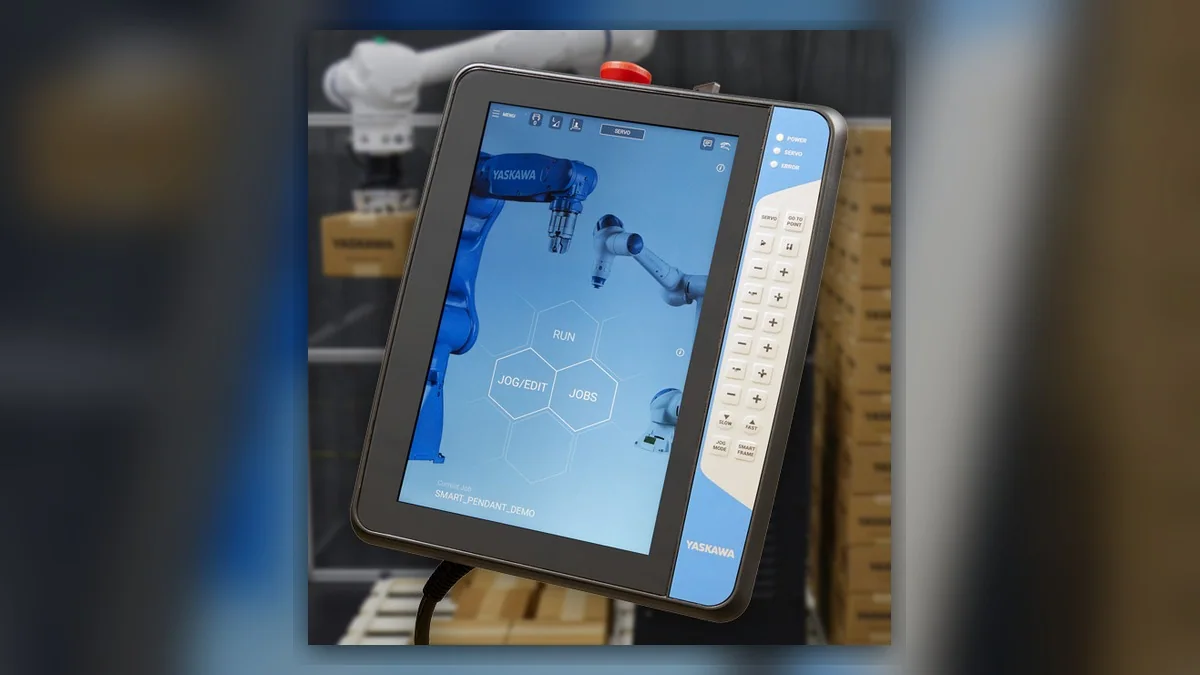
In this article
Yaskawa robot repair for unresponsive teach pendant keys begins by separating a missing key input from a command the controller cannot currently accept. Potentially involved systems include the pendant keypad, pendant connection, controller interface, and operating context. Record the robot and controller models, pendant identification, affected keys, screen state, and complete alarm history before resetting anything. A key that produces no visible action does not independently prove keypad damage: the selected screen, access level, or operating state may affect whether its function is available.
Symptoms and Scope
This guide addresses ordinary pendant keys that appear unresponsive on a Yaskawa industrial robot system. It applies only after the installed controller and pendant combination has been identified. Key functions, diagnostic displays, and connection procedures vary by equipment version and must be checked against its operating and maintenance information.
A blank display, total controller startup failure, or lost servo power requires a different diagnostic path. Emergency-stop and enabling-device faults also fall outside this keypad-focused sequence. If either safety function behaves unexpectedly, stop troubleshooting ordinary keys and follow the applicable safety procedure.
Information to Record First
Describe the observed response precisely: one key, a group of keys, or all ordinary keys; whether the display remains responsive; and whether the command works in its documented operating context. Preserve existing evidence without repeatedly pressing a suspect key.
Complete alarm code and full text: Record every displayed message, or state that none appeared.
Date and exact time: Record when the input failure occurred.
Faulted axis: Record only if an associated alarm identifies one.
Robot position/posture: Record the stationary position or posture at the event.
Program step or motion: Identify the active task and screen.
Actual speed and load condition: Record available operating information if motion was involved.
Reset result: Describe any reset already performed.
Time until recurrence: Record only if recurrence has already occurred.
Related power, communication or feedback alarms: Preserve their order in the event history.
Yaskawa Robot Repair Diagnostic Sequence
First, confirm the expected key function. Use the pendant identification and current screen as inputs, then consult the matching operating information. If the function is unavailable in that context, document the reason before considering hardware repair. If the expected behavior remains unclear, obtain the correct manual and software identification. Do not change access permissions or operating settings simply to make the key respond.
Next, establish the extent of the symptom. Compare existing observations of affected and unaffected keys. A working display with one unresponsive key may support a localized input investigation, but it does not establish the failed part. A frozen interface or several unavailable functions requires broader controller and communication review. Any functional check should use a documented, non-motion operation with no hazardous process consequence.
Inspect accessible external condition after applying site isolation requirements. Look for a damaged key surface, contamination, a strained cable, or visible connector damage. Record photographs and locations. These observations can justify further inspection, but appearance alone cannot establish electrical continuity or internal keypad condition. Do not open the pendant, disconnect equipment while energized, or apply cleaning chemicals without the applicable procedure.
Review event history and recent work. Determine whether the symptom followed pendant replacement, cable handling, cleaning, or a software or configuration change. A timing relationship identifies an investigation branch; it does not prove causation. If communication alarms occurred first, investigate them using the matching controller documentation before attributing the problem to individual keys. Do not flex a damaged cable or repeat a hazardous operation to reproduce the fault.
When Component Inspection or Repair Is Appropriate
Professional pendant testing becomes reasonable when the expected function is confirmed, the symptom is documented, and operating context does not explain it. Where manufacturer documentation provides an input diagnostic display, suitably competent personnel can use that procedure to distinguish an input not being registered from a registered command being unavailable. Without such evidence, report the diagnosis as unresolved.
If repair or replacement is proposed, match the exact pendant model, part number, hardware revision, and connector layout. Verify compatibility with the installed controller rather than relying on appearance. A replacement recommendation should identify the evidence supporting it and the remaining uncertainty.
For a repair inquiry, provide the robot model, controller model, complete alarm code or confirmation that none is displayed, alarm history, component label, fault conditions, and clear photographs of the pendant, affected keys, and accessible connections. ZHB is an independent industrial robot inspection, repair and maintenance service provider that also supplies parts to overseas customers; service information is available at https://autonews.best/services.
Verification After Repair
Verify repaired keys against their documented functions and confirm that the interface remains responsive. Record the installed component identification and results. If motion is needed for final verification, only suitably competent personnel should perform it under controlled conditions, following the applicable manufacturer operating information and site safety procedure. Stop if unexpected behavior occurs. A successful reset alone does not demonstrate that the original input fault has been resolved.
Need a part or repair assessment?
Share the robot model, part number, fault details and destination country with our team.
Contact our team ↗