
Yaskawa JANCD-YCP21-E Communication/CPU Board Fault Repair: Startup and Communication Anomaly Troubleshooting
When the Yaskawa JANCD-YCP21-E board experiences controller startup anomalies, communication interruptions, board offline status, or system errors, the power supply, backplane, connectors, and system configuration should be checked.
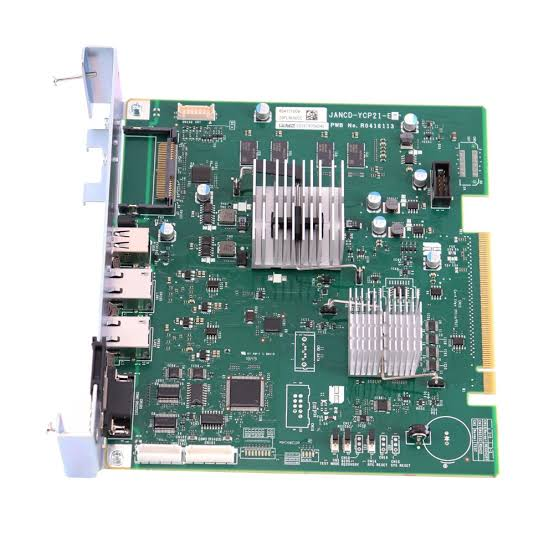
The JANCD-YCP21-E is used for computation or communication in Yaskawa robot control systems. Board failure may affect controller startup, device communication, program execution, and peripheral signal exchange.
The key to on-site diagnosis is first determining the fault scope, then deciding on the repair target. During inspection, record alarms, axis numbers, robot posture, and recurrence conditions. Avoid replacing components based solely on a single alarm.
- Common Fault Manifestations
- System fails to start normally after control cabinet is powered on.
- Controller cannot recognize the JANCD-YCP21-E.
- Communication interruption between the robot and peripheral devices.
- Fault occurs intermittently with control cabinet temperature or vibration.
- Possible Causes
- Abnormal board power supply or backplane connection.
- Damaged interface cables, connectors, or communication modules.
- Mismatch between system software and hardware versions.
- Cracked or corroded solder joints on the board, or abnormal memory.
- External device or network configuration failure.
- On-Site Troubleshooting Sequence
- Record controller model, software version, and complete alarm information.
- Check board power supply, indicator status, backplane, and connectors.
- Check communication cables, peripheral devices, and network configuration.
- Backup programs, parameters, zero points, and system files.
- After confirming peripheral devices are normal, repair the board or replace it with an identical version.
- Verification Before Replacing Components
Verify the complete part number, hardware version, control cabinet model, and software environment of the JANCD-YCP21-E. Complete a system-level backup before replacement.
Similar appearance does not mean direct interchangeability. Before procurement, provide the complete equipment model, original component nameplate, interface photos, controller model, and alarm information.
- Post-Repair Verification and Recommissioning
After startup, confirm board recognition, no system alarms, program loadability, normal communication and I/O. Then proceed with low-speed robot and automatic program verification.
After repair completion, also save test results, replaced component part numbers, and final parameters to facilitate tracking by subsequent maintenance personnel.
- Summary
When handling such faults, troubleshoot in the order of alarm records, power supply and connections, feedback circuits, mechanical load, and the component itself. Only after external conditions are confirmed normal can you further judge whether the target component requires repair or replacement.
Industrial Robot Repair Hotline: +86 18122009539
Contact Repair Engineer: +86 18122009539