
ABB IRC5 Robot Repair for an Undetected Drive Unit
Diagnose an ABB IRC5 drive unit that is not detected by separating power, connection, configuration, communication, and hardware causes.
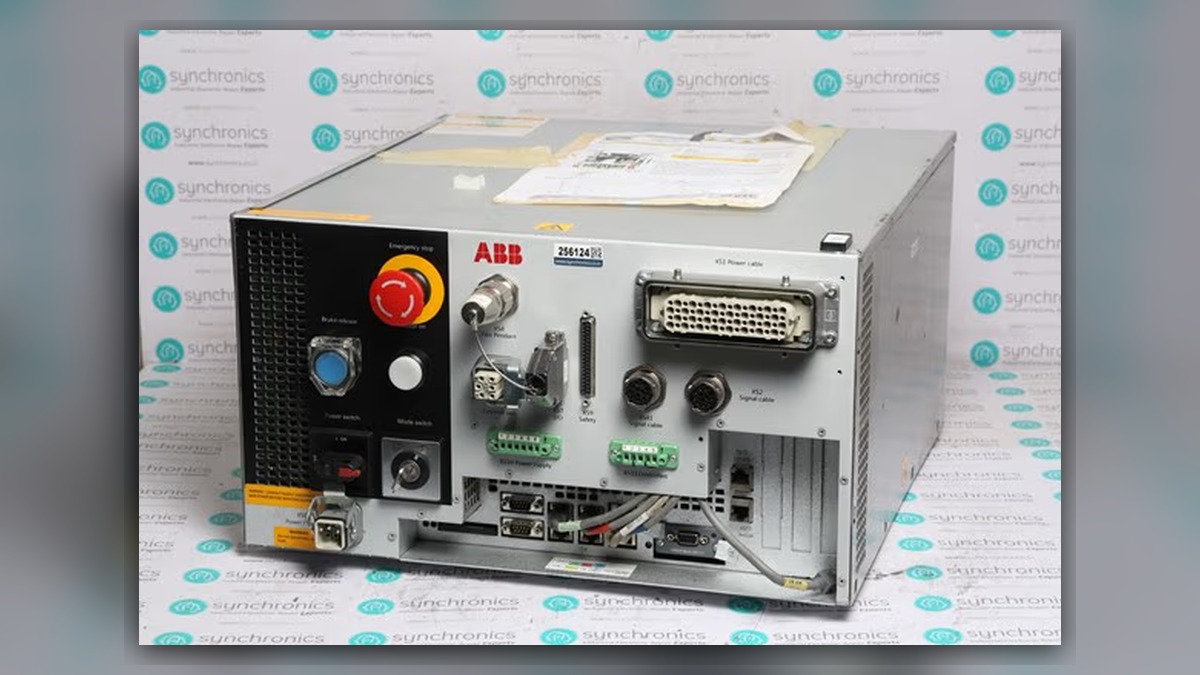
ABB robot repair for an undetected IRC5 drive unit should begin with the complete event message, controller identity, affected axis or drive position, and recent service history. Potentially involved systems include cabinet power distribution, drive-unit connections, controller communication, installed configuration, and the drive hardware itself. A missing or unidentified drive unit does not independently prove that the unit is defective. Loss of supply power, a disturbed connector, incompatible hardware, or incorrect configuration can produce a similar startup symptom.
Symptoms and Scope
This diagnostic process applies to ABB IRC5 systems in which a drive unit expected by the installed robot configuration is not recognized correctly during startup or controller initialization. Depending on the controller configuration, the robot may remain unable to enable motor power, or the event log may identify a drive-related communication or configuration problem.
The process does not apply automatically to every motor-on failure. If the event log instead identifies an emergency-stop circuit, safety-system state, axis feedback problem, brake fault, or external interlock, that earlier and more specific event should direct the investigation. The displayed symptom alone cannot confirm whether the drive unit, controller computer, power distribution, motor, or cabling is damaged.
Information to Record First
Capture the evidence before resetting alarms, disconnecting equipment, restoring a backup, or exchanging parts. A reset may remove useful context without correcting the underlying condition.
Complete alarm code and full text:
Date and exact time:
Faulted axis:
Robot position/posture:
Program step or motion:
Actual speed and load condition:
Reset result:
Time until recurrence:
Related power, communication or feedback alarms:
Also record the robot model, IRC5 controller variant, system identity, drive-unit label, part number, hardware revision, and connector layout. Note whether the problem began after cabinet work, component replacement, software restoration, transport, prolonged storage, or an unexpected loss of power.
Safety and Preparation
Follow the applicable ABB operating information and the factoryâÂÂs lockout, electrical-safety, and stored-energy procedures. Cabinet inspection must be performed by suitably qualified personnel. Do not reseat internal connectors, exchange drive units, or measure energized circuits unless the task is authorized and supported by the correct service documentation for the installed controller.
Preserve a current system backup when the controller condition permits. Do not change configuration data merely to test whether the event disappears. An incorrect configuration can introduce additional faults or create a mismatch between the controller and the physical robot system.
ABB Robot Repair Diagnostic Sequence
1. Review the complete event sequence. Use the timestamp and event history to identify the first relevant message, not only the final motor-on failure. If a cabinet power, controller communication, or configuration event occurred first, investigate that branch before treating the drive unit as faulty. Missing event text or an incomplete history should be obtained before selecting parts.
- Confirm the equipment identity. Compare the installed robot, controller, drive-unit label, system configuration, and available maintenance records. If a unit was recently replaced, verify the exact part number, hardware revision, and connector arrangement. Similar-looking ABB components should not be assumed to be interchangeable. If compatibility records are unavailable, obtain verification before applying power with another unit.
- Inspect external and de-energized cabinet conditions. Look for loose or incompletely latched connections, damaged cable insulation, displaced connector locks, contamination, corrosion, overheating marks, or evidence of liquid ingress. Inspect only locations covered by the documentation for the installed IRC5 variant. Visible heat damage requires evaluation of both the component and its mating connection; replacing only one side may leave the original cause unresolved.
- Check the circumstances of the first failure. If the event appeared immediately after cabinet service, focus on disturbed connections, component placement, and configuration changes. If it developed during normal production, review preceding power and communication events and the operating environment. If it follows contamination or overheating, keep the controller de-energized until the extent of damage has been assessed.
- Separate configuration from hardware. A drive unit that is physically installed but not represented correctly in the active system configuration may produce a different diagnostic path from a previously operating unit that suddenly disappears. Compare the current system information with a known controlled backup or commissioning record. Do not load an unverified backup or edit parameters as a trial repair.
- Decide whether component-level testing is justified. If supply, connections, cabinet condition, and configuration have been verified but the drive remains undetected, professional bench inspection may be appropriate. Testing should evaluate the identified unit and relevant interfaces without assuming that an associated motor or mechanical axis caused the detection failure. Motor, feedback-related component, and mechanical inspection should be added only when the event history or other evidence supports those branches.
When Repair or Replacement May Be Considered
Repair may be considered when inspection identifies serviceable internal damage and the unit can be tested against defined acceptance criteria. Replacement may be more appropriate when damage is extensive, the correct repair data are unavailable, or production requirements favor a verified matching spare. Neither option should be selected solely because the drive is absent from the controller display.
Any replacement must match the required model, ABB part number, hardware revision, electrical application, and connector layout. Configuration and system compatibility must be confirmed for the installed robot. The broader ABB IRC5 controller inspection and repair service is described at https://autonews.best/products/abb-irc5-kong-zhi-gui-yu-ji-xiu.
Verification After Repair or Replacement
After authorized work, confirm that the controller starts without the original detection event and that the expected hardware appears correctly in the system. Review the event log before enabling motion. Verify safety functions and motor-on operation according to ABB documentation and the siteâÂÂs commissioning procedure.
Any observation under motion must be performed by competent personnel under controlled conditions. Begin with the site-approved low-risk verification process, monitor the affected axis, and stop if new power, communication, feedback, temperature, noise, or motion abnormalities appear. Do not repeatedly recreate an event if doing so could increase equipment risk.
Information Required for a Repair Inquiry
For an efficient industrial robot repair service inquiry, provide the robot model, IRC5 controller model, complete alarm code and text, alarm history, drive-unit label, fault conditions, and clear photographs of the cabinet, component label, connectors, and visible damage. ZHB is an independent industrial robot inspection, repair, and maintenance service provider that also supplies parts to overseas customers. Complete identification helps determine whether remote guidance, controller inspection, component repair, or a correctly matched replacement should be considered.
Conclusion
An undetected ABB IRC5 drive unit is a system-level symptom rather than proof of drive failure. Preserve the event history, confirm equipment identity, inspect de-energized connections and cabinet condition, and verify configuration before removing components. Evidence-based separation of power, communication, configuration, and hardware causes reduces unnecessary part replacement and supports safer restart verification.