
ABB Robot Maintenance After an Unplanned Power Loss
Use this ABB robot maintenance process to document an unplanned power loss, inspect affected systems, and verify a controlled restart safely.
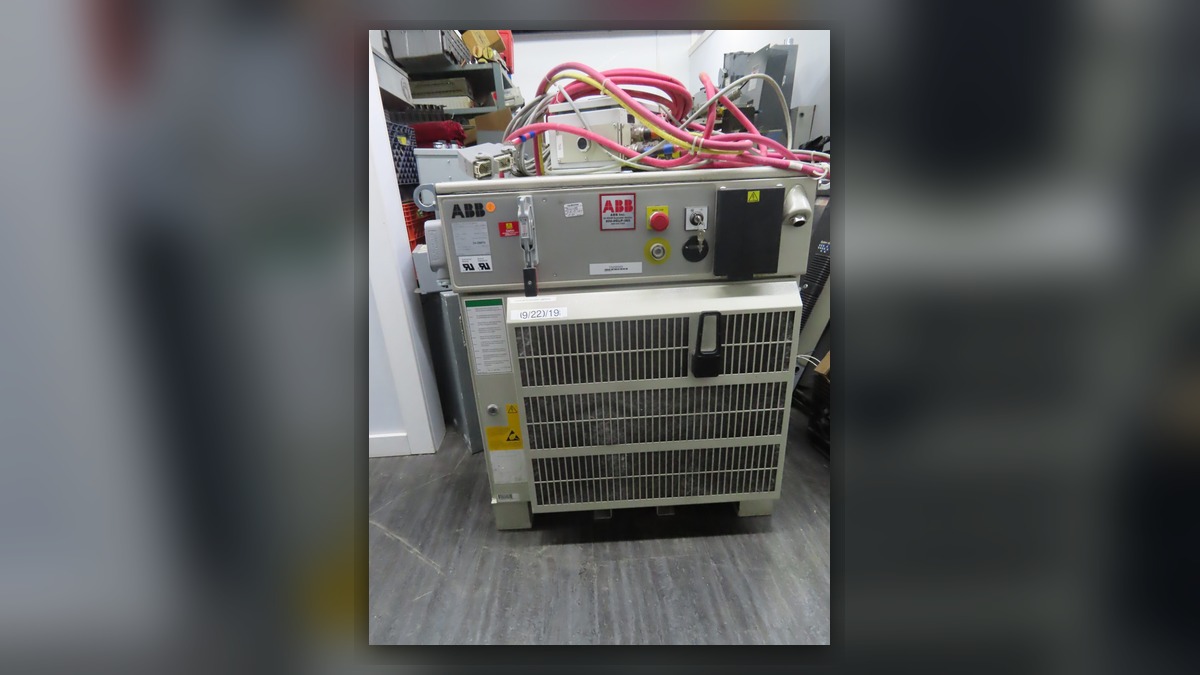
An ABB robot maintenance inspection after an unplanned power loss should begin with the controller event history, the operating state at shutdown, and the condition of the incoming supply, cabinet, manipulator cables, and connected equipment. Record the robot model, controller model, complete alarm text, faulted axis, and shutdown time before resetting anything. A robot that stops, loses calibration data, or behaves abnormally after power returns may involve power, control, feedback, brake, cable, or mechanical systems. The symptom alone does not prove that a controller module or servo motor is damaged.
Symptoms and Scope
This procedure applies to ABB industrial robots that experienced an unexpected loss of facility power, an interrupted controller supply, or an unexplained shutdown associated with a power event. It is intended for initial maintenance triage and repair planning, not live electrical diagnosis or internal component disassembly.
Relevant observations may include failure to restart, new alarms, loss of motor-on status, an axis that does not move as expected, changed calibration behavior, or a controller that shuts down again. These observations must be evaluated with the alarm history and equipment configuration. They cannot independently confirm a damaged drive unit, power supply, servo motor, brake, or feedback-related component.
Information to Record First
Preserve the available evidence before clearing alarms or attempting repeated restarts. If the robot is connected to a larger production cell, record the condition of associated safety devices, external axes, process equipment, and communication networks at the same time.
Complete alarm code and full text:
Date and exact time:
Faulted axis:
Robot position/posture:
Program step or motion:
Actual speed and load condition:
Reset result:
Time until recurrence:
Related power, communication or feedback alarms:
Also record whether other machines stopped, whether the controller restarted automatically, and whether any maintenance work occurred immediately before the event. Missing timestamps or incomplete alarm records can make it difficult to distinguish a facility power interruption from a robot-specific fault.
Safety and Preparation
Place the robot and surrounding cell in a safe condition according to the site lockout, electrical safety, and stored-energy procedures. Qualified personnel should confirm that the work area is protected before inspecting the cabinet, manipulator, cables, or tooling. Do not bypass safety circuits, force motor power on, or repeatedly reset a robot that produces abnormal noise, odor, heat, smoke, visible damage, or recurring protection trips.
Any observation under motion should be performed only by suitably competent personnel under controlled conditions and in accordance with the applicable ABB operating information and site safety procedure. Do not repeat the original operation merely to reproduce a potentially damaging event.
ABB Robot Maintenance Diagnostic Sequence
- Confirm the equipment identity. Record the complete robot designation, controller model, installed options, external-axis configuration, and the labels of any suspected components. This information determines which documentation and connection layout apply. Do not assume that two visually similar ABB systems use interchangeable modules or motors.
- Review the event sequence. Compare controller alarms with facility power records, upstream protective-device indications, cell PLC events, and operator reports. Determine whether the robot alarm preceded the power loss or appeared after power returned. An earlier robot alarm may indicate that the shutdown was a consequence rather than the original cause.
- Inspect the external supply path. With the equipment safely isolated, qualified personnel should check for visible damage, loose external connections, contamination, or evidence that upstream protection operated. Electrical measurements should be made only under an approved procedure with suitable instruments and known measurement conditions. Without those conditions, a recorded value should not be used to condemn a robot component.
- Examine the controller externally. Check the cabinet for unusual odor, contamination, moisture, blocked ventilation, damaged cables, and abnormal indicator states documented by the operator. For an IRC5 system that does not restart normally, professional controller inspection may be appropriate: https://autonews.best/products/abb-irc5-kong-zhi-gui-yu-ji-xiu. Internal inspection should be limited to trained personnel using the correct controller documentation.
- Check manipulator and axis evidence. Inspect accessible motor and manipulator cable routes for impact, pulling, abrasion, loose connections, or contamination. If one axis is affected, compare its alarm history and physical condition with the other axes. A stationary axis after power restoration may involve control authorization, a brake, cabling, feedback, the drive system, or a mechanical restriction; it is not automatically evidence that the motor has failed.
How to Distinguish Similar Causes
A controller that remains off points first toward the supply path, controller power system, protection devices, or startup sequence. A controller that starts but cannot enable motion requires review of safety status, enabling conditions, alarm history, drive readiness, and installed configuration. A single-axis symptom shifts attention toward that axis, but the motor should not be removed until cable, connector, drive, feedback, brake, and mechanical possibilities have been separated as far as the available evidence permits.
ABB servo motor repair may be considered when documented inspection or bench testing identifies a motor-related defect. Before arranging ABB servo motor repairs, match the exact motor model, part number, hardware revision, connector layout, mounting arrangement, and associated axis information. A replacement selected by appearance alone may be incompatible even when its housing is similar.
Repair Inquiry Information
In the latter half of the diagnostic process, an independent provider may help evaluate whether inspection, repair, or replacement is appropriate. ZHB provides industrial robot inspection, repair, maintenance, and parts supply for overseas customers without implying manufacturer authorization. A useful inquiry should include the robot model, controller model, complete alarm code, alarm history, component label, fault conditions, and clear photographs. Relevant ABB service information is available at https://autonews.best/abb-robot-repair.
Verification After Repair or Maintenance
After the identified cause has been addressed, verify that protective covers and connectors are secure, tools have been removed, and the work area is controlled. Confirm controller startup, alarm status, safety functions, calibration status, and axis behavior using the applicable maintenance procedure. Begin with low-risk checks before any controlled motion assessment.
Where motion verification is required, use an approved test program, suitable speed, known payload condition, and appropriate exclusion controls. Monitor for recurring alarms, abnormal sound, unexpected position behavior, heat, or communication loss. Stop the test if the original fault returns or a new unsafe condition appears. Record the completed work, replaced component identifiers, verification conditions, and final alarm history for future ABB robot maintenance.
Common Diagnostic Mistakes
Avoid clearing the event history before recording it, treating every post-outage alarm as the root cause, or ordering a motor based only on an axis symptom. Other mistakes include ignoring upstream equipment, installing a visually similar spare without checking its full identification, and returning the robot to production without confirming calibration and safety status.
Conclusion
An unplanned power loss requires evidence-based inspection rather than immediate parts replacement. Preserve the event sequence, confirm the exact ABB equipment configuration, inspect the external supply and visible connections, and separate controller-wide symptoms from single-axis behavior. Professional testing should be considered when the evidence points toward an internal controller, drive, cable, brake, feedback, or servo motor problem that cannot be safely confirmed on site.