
ABB Robot Alarm Code Troubleshooting: A Practical Guide for Maintenance Engineers
This guide provides a systematic approach to diagnosing and resolving common ABB robot alarm codes, focusing on logical fault isolation and safe maintenance practices.
In this article
01Introduction to ABB Robot Alarm Codes
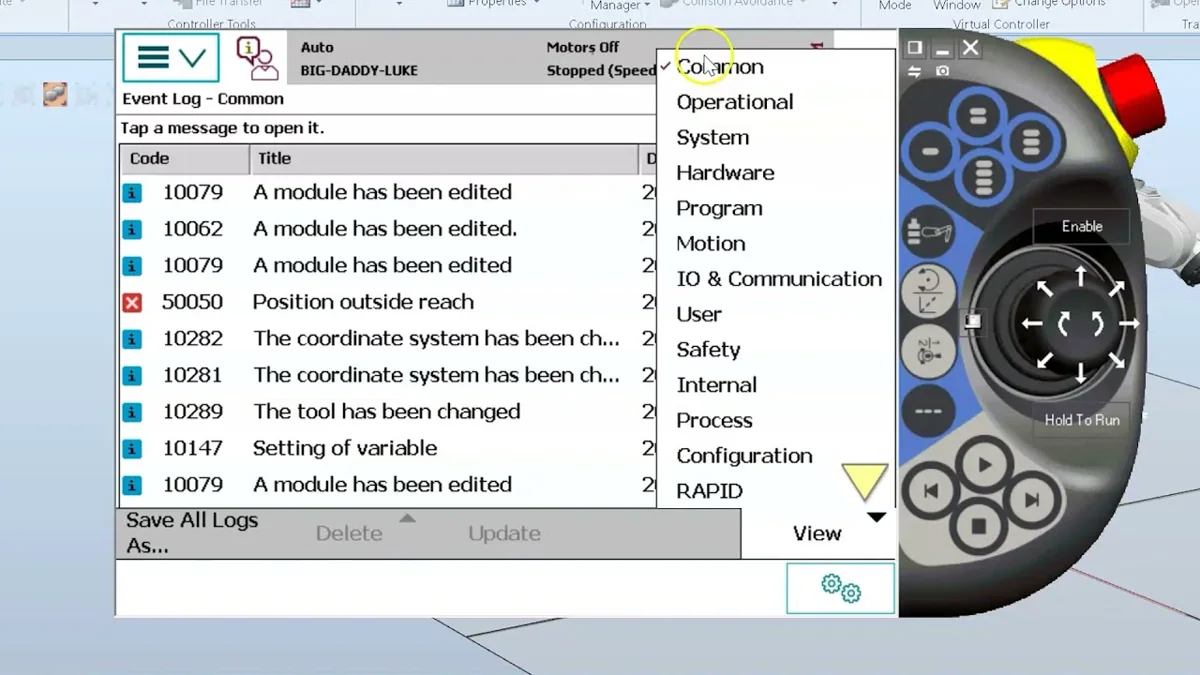
ABB industrial robots utilize a comprehensive alarm and event logging system to indicate operational issues, safety violations, or hardware faults. These alarm codes, displayed on the FlexPendant or in RobotStudio, are the primary diagnostic tool for maintenance personnel. Understanding how to systematically interpret and act upon these codes is crucial for minimizing downtime. This guide outlines a general methodology for troubleshooting common ABB robot alarms, emphasizing safe work practices and logical fault isolation. Always refer to the specific documentation for your robot model (e.g., IRC5, OmniCore) and software version, as code meanings and resolutions can vary.
02The Troubleshooting Mindset: From Code to Cause
An alarm code is a symptom, not the root cause. The first step is to accurately record the exact alarm number and message. Do not immediately power cycle the robot, as this may clear valuable diagnostic information. Instead, note the code and check the robot's event log for any preceding warnings or related events. This context is often key to understanding the fault sequence. Common alarm categories include:
* System Alarms: Related to the controller hardware, software, or communication.
* Motion/Alignment Alarms: Concerning axis movement, motor temperatures, or resolver/encoder issues.
* I/O & Communication Alarms: Pertaining to fieldbus networks, digital/analog signals, or communication with external devices.
* Program & RAPID Alarms: Triggered by errors in the robot program execution or logic.
* Safety System Alarms: Involving safety stops, emergency stops, or safety gate violations.
03Systematic Fault Isolation Procedure
- Initial Assessment & Safety: Upon receiving an alarm, first ensure the work cell is in a safe state. Follow lock-out/tag-out (LOTO) procedures before entering the safeguarded space. Visually inspect for obvious issues like loose cables, damaged mechanical components, or environmental factors (e.g., excessive heat, moisture).
- Consult the Documentation: Use the alarm code to look up the official description in the applicable ABB troubleshooting manual or the help function within RobotStudio. The manual will provide a list of possible causes and recommended actions. Never ignore or bypass safety-related alarms (e.g., SMB, SafeMove).
- Isolate the Subsystem: Determine which subsystem the alarm points to. For example, a motor overheating alarm (e.g., related to `MOTOR TEMP`) points to the drive module, motor, or mechanical load on that axis. A `Lost Communication` alarm points to network cables, connectors, or configuration.
4. Perform Basic Checks: Before assuming a major component failure, perform fundamental checks:
* Power: Verify all power supplies (controller, drives, I/O units) are within specification.
* Connections: Reseat cables and connectors related to the suspected subsystem. Check for bent pins or corrosion.
* Mechanical Load: Manually move the axis (with motors disabled, following safety procedures) to check for binding, excessive friction, or collision damage.
* Parameters: While system parameters should not change unexpectedly, in rare cases of battery failure or corruption, critical calibration data (like axis calibration offsets) may be lost, leading to alignment alarms.
- Utilize Diagnostic Tools: ABB systems offer built-in tools. Use the I/O monitor to check signal states, the drive module status LEDs for fault indications, and the service information screens for detailed motor and drive data (current, temperature). RobotStudio's connection to a live system can provide extensive logs and diagnostic functions.
04Common Alarm Scenarios and General Approaches
- "Axis Computer Not Ready" or Communication Faults: Often related to the drive module or communication between the main computer and axis computer. Check fiber optic cables (DRVI/O) for damage, ensure all modules are securely seated in the rack, and verify the system has proper grounding.
- Motor Overheating Alarms: Causes can be a failing motor, a defective temperature sensor, excessive mechanical resistance (worn gearbox, tight bearings), or a drive module providing incorrect current. Monitoring the motor temperature trend in the service menu can help differentiate between a sustained overload and a sensor fault.
- SMB (Serial Measurement Board) or Calibration Alarms: These are critical for the robot's absolute accuracy. They often indicate a low backup battery, physical impact disturbing the resolver alignment, or a faulty SMB board. The resolution typically involves replacing the battery and performing a calibration routine as specified in the manual.
- Program Execution Stops (e.g., "STOPL"): These are often I/O-related, where the program is waiting for a signal that never arrives. Trace the logic in the RAPID program and verify the physical input signal using the I/O monitor.
05Critical Safety and Maintenance Reminders
- Qualified Personnel Only: Troubleshooting and repair of industrial robots must be performed by trained and qualified personnel.
- Follow Manual Procedures: Always adhere to the step-by-step procedures outlined in the official ABB product manuals for calibration, component replacement, and recovery actions.
- No Safety Bypasses: Do not disable, bypass, or modify safety functions, interlocks, or SafeMove configurations. This creates serious hazards and violates safety standards.
- Documentation is Key: Keep a log of recurring alarms, actions taken, and component replacements. This history is invaluable for identifying chronic issues or predicting failures.
By adopting a structured, safety-first approach and leveraging the robot's own diagnostic capabilities, maintenance teams can efficiently resolve common ABB robot alarms and ensure reliable, continuous operation.
Need a part or repair assessment?
Share the robot model, part number, fault details and destination country with our team.
Contact our team ↗