
Yaskawa YRC1000 Robot Encoder Battery Alarm Repair: Methods for Origin Loss and Position Data Recovery
When a Yaskawa YRC1000 robot exhibits encoder battery alarms, abnormal origin data, or servo enable failure, the fault may originate from insufficient battery voltage, loose battery connectors, abnormal feedback cables, or loss of absolute encoder position data. This article introduces fault diagnosis, battery inspection, origin confirmation, and restart verification methods for the YRC1000 control system.
In this article
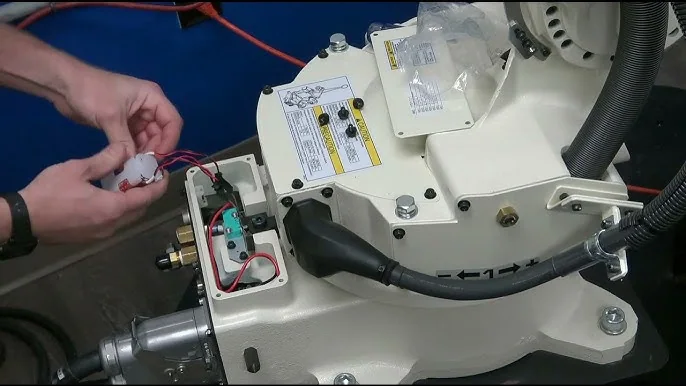
Yaskawa robots record the absolute position of each axis through servo motor encoders. After the control cabinet is powered off, the encoder backup battery continues to maintain the position data. When the battery voltage is insufficient, the plug is loose, or the circuit is disconnected, the YRC1000 control system may generate alarms related to the encoder battery, absolute value, or origin.
On-site Judgment Conclusion:
If only a low battery voltage warning appears and the position data is not yet lost, promptly replacing the battery with the correct specifications can usually preserve the original position. If the absolute position data has already been lost, after replacing the battery, it is also necessary to check the robot's origin, tool coordinates, and program points.
Scope of Application:
This article primarily applies to Yaskawa six-axis industrial robots configured with the YRC1000 control cabinet. Differences may exist depending on the robot body model, software version, and external axis configuration. The specific battery model, alarm meanings, and calibration procedures should be based on the corresponding equipment manual.
1. Common Manifestations of Encoder Battery Alarms
When a Yaskawa YRC1000 robot experiences encoder battery or absolute position faults, the following may occur on-site:
- The teach pendant displays insufficient encoder battery voltage.
- An alarm appears after the robot control cabinet is powered off and restarted.
- Abnormal absolute position data for one or more axes.
- The robot servo cannot be enabled normally.
- The controller prompts to confirm the origin position.
- Overall deviation in existing program points.
- The alarm persists after battery replacement.
- Abnormal position data for external axes or positioners.
First, record the complete alarm content, faulty axis number, and control cabinet status to determine whether the fault belongs to a single axis, multiple robot axes, or external axes.
2. Difference Between Low Voltage Warning and Position Loss
Low Battery Voltage Warning
The battery power has decreased, but the encoder absolute position data may still be valid. At this time, replacement should be arranged as soon as possible to avoid position data loss after the control cabinet is powered off.
Absolute Position Data Loss
The encoder backup power supply has been interrupted, and the controller cannot confirm the motor's absolute position. Even after installing a new battery, the lost mechanical positional relationship cannot be automatically restored.
Therefore, upon discovering a low battery voltage warning, it should be addressed promptly; do not wait until the robot is completely unable to enable before replacing the battery.
3. Information to Record Before Repair
Before starting repairs, record the following:
- Yaskawa robot body model.
- YRC1000 control cabinet model and software version.
- Complete alarm code and alarm text.
- Control group and axis number corresponding to the alarm.
- The robot's current mechanical posture.
- Whether a low voltage warning existed before the control cabinet was powered off.
- Whether motors, encoders, or batteries have been replaced recently.
- Whether robot origin and calibration data are saved.
- Whether external axes or positioners are also alarming.
It is recommended to photograph the robot's current posture, the teach pendant alarm screen, and the mechanical marks of each axis to avoid lacking reference for subsequent position judgment.
4. Key Points for Checking the Encoder Backup Battery
When checking the battery, pay attention to:
- Whether the battery specifications match the original configuration.
- Whether the battery voltage and capacity meet requirements.
- Whether the battery polarity is correct.
- Whether the plug is fully inserted.
- Whether the battery wires are broken, pinched, or have poor contact.
- Whether the battery case has corrosion, oil contamination, or liquid ingress.
- Whether the connector pins are bent, oxidized, or retracted.
- Whether the new battery is within its validity period.
Do not use ordinary batteries or products of different specifications as temporary replacements. Voltage, capacity, or interface mismatches may cause alarms to reappear or damage related circuits.
5. What to Pay Attention to When Replacing the Battery
If the robot only shows a low voltage warning and the position data is not yet lost, replace the battery according to the status and sequence specified in the corresponding Yaskawa equipment manual.
Some equipment requires completing the replacement while the control system maintains a specified power supply state to avoid a complete interruption of the encoder backup power. Before operation, confirm the battery location, plug structure, and replacement procedure.
During replacement, avoid:
- Disconnecting all backup power connections simultaneously.
- Disassembling battery wiring without recording the original state.
- Reversing the battery plug connection.
- Pulling or damaging connector wires.
- Using metal tools causing interface short circuits.
- Turning off the control cabinet without confirming the alarm status.
After battery replacement is complete, check if the alarm has disappeared and record the replacement date and equipment serial number.
6. Why the Alarm Persists After Battery Replacement
Common reasons include:
- Incorrect battery specifications or voltage.
- The battery plug is not fully inserted.
- An open circuit exists in the battery wiring.
- Poor connector contact.
- Abnormal encoder feedback circuit.
- The encoder itself has failed.
- The alarm has not been reset as required.
- Absolute position data has already been lost.
- The controller needs to reconfirm the origin.
If the new battery is installed correctly but the alarm persists, continue checking the power supply lines, connectors, and encoder. Do not attempt to replace multiple batteries consecutively.
7. How to Judge Single-Axis vs. Multi-Axis Alarms
Only one axis is alarming:
Prioritize checking that axis's servo motor encoder, feedback cable, connector, and corresponding power supply lines.
Multiple robot axes alarming simultaneously:
Prioritize checking the common battery pack, battery plug, common power supply lines, and recent replacement operations.
External axis alarming alone:
Focus on checking the external axis motor encoder, battery configuration, feedback cable, and corresponding control group.
Robot axes and external axes alarming simultaneously:
Check the common power supply, control cabinet status, and related communication lines. Avoid directly concluding that multiple encoders have failed simultaneously.
8. How to Determine if the Robot Origin is Lost
After handling the alarm, confirm the origin status through the following items:
- Whether the mechanical marks of each axis can correctly correspond.
- Whether the axis angles displayed on the teach pendant match the current posture.
- Whether the robot can accurately reach known reference points.
- Check if the Tool Center Point (TCP) calibration point has shifted.
- Determine if the original program points have changed overall.
- Verify if the positions of the fixed fixture and calibration pin are consistent.
- Confirm if the relative position between the external axis and the robot is correct.
If multiple program points shift simultaneously in a similar direction, priority should be given to checking the robot's home position, tool coordinates, and user coordinates. Do not compensate by modifying program points individually.
9. Check the mechanical body before restoring the home position.
Position deviation is not necessarily caused solely by encoder data loss. Before calibration, also check:
- Whether the robot has recently experienced a collision.
- If the installation position of the servo motor has changed.
- Whether there is abnormal backlash in the reducer.
- If the tool flange and mounting bolts are loose.
- Whether the robot base has shifted.
- If the workpiece fixture or calibration jig has moved.
- Whether the tool weight and TCP have changed.
If the mechanical body has shifted or been damaged, merely resetting the home position will not restore the original positioning accuracy.
10. Main methods for restoring the home position.
Restoring original calibration data.
If reliable factory data or historical maintenance records are available, restore according to the corresponding manual and verify using fixed reference points.
Mechanical mark calibration.
Move each axis to the position corresponding to its mechanical mark, then execute the specified home position setting. The accuracy of this method is affected by the mechanical marks and operational errors. After completion, TCP and program points must be verified.
Single-axis home position recovery.
If only one axis has lost its position due to motor, encoder, or maintenance operations, address the faulty axis after confirming the others are normal.
Special jig calibration.
For production lines with high positioning requirements, such as welding, machining, and precision assembly, use corresponding calibration tools or fixed jigs for position recovery.
11. Checking the encoder feedback circuit.
If position alarms persist after replacing the battery and restoring the home position, check the feedback link:
- Encoder connector on the motor side.
- Feedback interface on the control cabinet side.
- Robot body's flexible cable.
- Connector pins and locking mechanisms.
- Feedback cable shielding and grounding.
- Whether the cable is stretched in specific postures.
If alarms occur only in certain robot postures, there is a high possibility of intermittent contact inside the body's flexible cable. A normal cable jacket does not guarantee the internal conductors are undamaged.
12. Alarm troubleshooting procedure.
Step 1: Record the alarm code, control group, and faulty axis number.
Step 2: Stop automatic operation and save the robot's current posture.
Step 3: Back up programs, system, and calibration data.
Step 4: Check the battery, battery holder, plug, and wiring.
Step 5: Install a new battery with the correct specifications.
Step 6: Handle the alarm according to the corresponding YRC1000 manual.
Step 7: Confirm the mechanical marks and current angle of each axis.
Step 8: Determine if absolute position data has been lost.
Step 9: Restore the robot's home position based on on-site conditions.
Step 10: Perform TCP, reference point, program trajectory, and process verification.
13. Post-maintenance restart verification.
After completing battery replacement and home position restoration, check in sequence:
- Whether the current encoder alarm has cleared.
- If the position data for each axis is reasonable.
- Whether the mechanical marks correspond to the teach pendant position.
- If the robot's low-speed single-axis motion is normal.
- Whether there are any abnormalities during forward and reverse operation.
- If known reference points can be reached accurately.
- Whether the tool TCP has shifted.
- If the unloaded program trajectory is normal.
- Whether the external axis and robot remain synchronized.
- If loaded operation and process samples are qualified.
When running the original program for the first time, reduce the speed and pay special attention to the robot's trajectory near fixtures, workpieces, and surrounding equipment.
14. Common questions.
Can production resume directly after replacing the encoder battery?
If it was only a low-voltage warning and position data was not lost, operation can resume after normal verification. If absolute position or home position abnormalities have already occurred, calibration and program verification must be completed first.
What causes all robot axes to alarm simultaneously?
Priority should be given to checking the common battery pack, connectors, and backup power supply lines.
Can program points be modified to compensate for position deviation?
Not recommended. Position deviation may originate from the robot's home position, tool coordinates, or user coordinates. Modifying program points can mask the actual fault.
How often should encoder batteries be replaced?
This should be determined based on the equipment manual, operating environment, and maintenance records, and addressed promptly when low-voltage warnings appear.
15. Summary.
When a Yaskawa YRC1000 robot displays an encoder battery alarm, first check the battery specifications, plug, and backup power supply lines, then confirm whether absolute position data has been lost.
Replacing the battery only restores backup power. If the robot's home position has become invalid, it is also necessary to complete home position restoration, TCP checks, low-speed operation, and program trajectory verification. Automatic production can only be resumed after all positioning and process results are normal.
Technical content reference: Yaskawa YRC1000 control system technical documentation and industrial robot field maintenance experience.
Content update time: September 2026.
Maintenance consultation.
If you need to handle Yaskawa YRC1000 robot encoder battery alarms, home position loss, or servo faults, please provide the robot model, control cabinet model, complete alarm screen, control group, faulty axis number, and photos of the robot's current posture.
Industrial robot maintenance hotline: +86 18122009539.
Contact maintenance engineer: +86 18122009539.
Need a part or repair assessment?
Share the robot model, part number, fault details and destination country with our team.
Contact our team ↗