
FANUC Robot Repair: Intermittent Teach Pendant Display
Diagnose an intermittent FANUC teach pendant display by recording fault conditions, identifying hardware, and checking evidence before replacing parts.
In this article
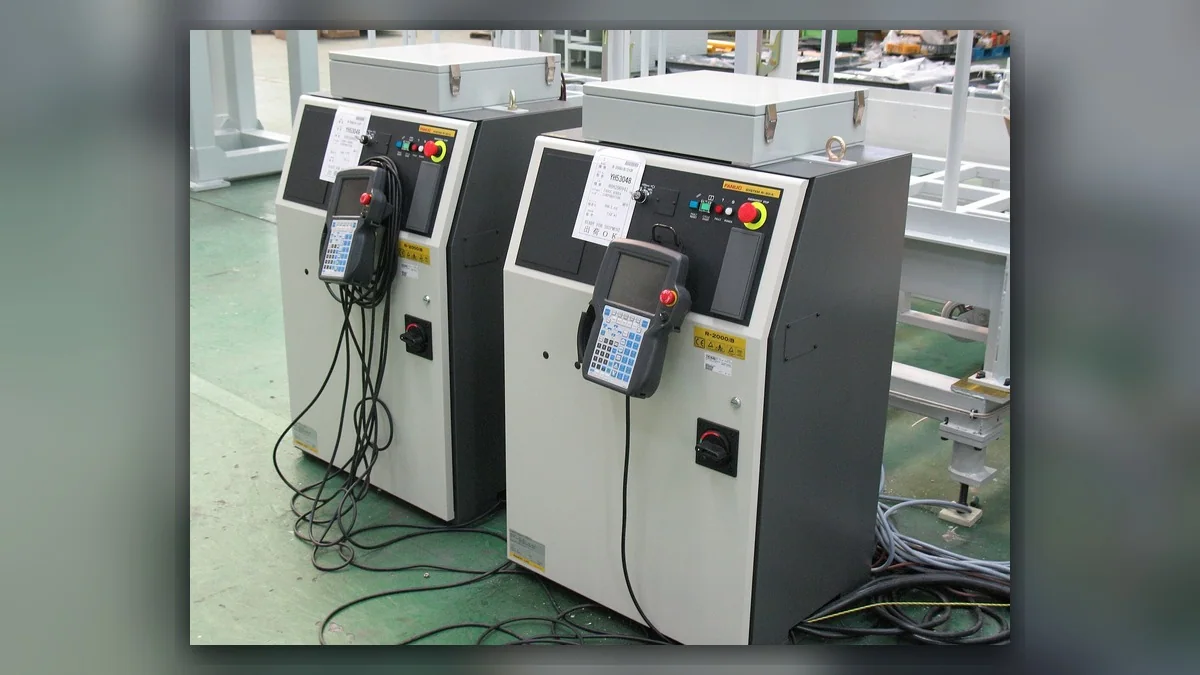
An intermittent FANUC teach pendant display requires diagnosis of the pendant, its cable and connections, and the controller-side interface supported by the installed equipment. Before troubleshooting, record whether the screen becomes dark, freezes, or restarts, whether the controller remains operating, and any associated alarms. Identify the robot, controller, and pendant before selecting maintenance instructions. A display interruption alone does not establish that the screen, cable, or controller is damaged; FANUC robot repair should begin with evidence that separates these possibilities.
Symptoms and Scope
This article addresses an intermittently interrupted teach pendant display on FANUC industrial robot systems. It does not cover a continuously blank pendant, an emergency-stop reset failure, or a controller that cannot start. Those symptoms require their own diagnostic procedures.
Pendant designs, cable arrangements, and controller interfaces vary. Confirm the installed equipment before applying any inspection or replacement procedure. A dark screen, a frozen image, and a complete pendant restart are different observations; record which occurs instead of describing every event as a display failure.
Information to Record First
Preserve controller alarm history and existing maintenance records before resetting equipment. Record whether the interruption occurred during normal pendant handling, while the pendant was stationary, or after recent service. Existing observations can help locate the investigation without deliberately flexing a suspect cable.
Complete alarm code and full text: Record associated alarms, or state that none were observed.
Date and exact time: Record the event time for comparison with controller records.
Faulted axis: Record any identified axis, or state that none was identified.
Robot position/posture: Record the position when the interruption occurred.
Program step or motion: Record the active operation or stationary state.
Actual speed and load condition: Record available operating information without estimating missing values.
Reset result: Record any reset already performed and its outcome.
Time until recurrence: Record the observed interval, or state that it is unknown.
Related power, communication or feedback alarms: Preserve their complete text and sequence.
Also record the controller model, pendant model, cable identification where available, and any recent cable replacement or connector work.
Safety and Preparation
Stop using a pendant with visible cable damage, exposed conductors, or a damaged housing pending assessment under the site safety procedure. Do not continue handling it to reproduce the interruption.
Before disconnecting connectors or opening equipment, follow the applicable FANUC maintenance instructions and the site's electrical isolation procedure. A dark display does not establish that the controller is isolated or that robot movement is impossible. Internal inspection and electrical testing belong with suitably competent personnel using the correct documentation.
FANUC Robot Repair Diagnostic Sequence
First, compare the display event with controller behavior using existing logs and operator observations. If the controller also restarted or recorded an earlier fault, investigate that event under the matching controller documentation before assigning the problem to the pendant. If controller behavior is unknown, obtain the records before selecting a repair target.
Next, inspect accessible external surfaces under safe conditions. Look for cable crushing, cuts, damaged strain reliefs, housing cracks, and visible connector damage. Damage identifies an inspection priority but does not independently explain every interruption. Record its location with photographs and refer the affected assembly for assessment.
Then review connection and service history. Confirm whether the installed pendant and cable match the controller configuration using equipment labels and applicable parts information. If the symptom began after replacement or reconnection, have qualified personnel verify compatibility and installation according to the matching procedure. Do not assume that a connector fitting physically establishes compatibility.
Finally, consider controlled component substitution only where the applicable maintenance procedure permits it. A correctly matched, serviceable assembly may help distinguish a pendant-side problem from a controller-side problem. Record exactly what was changed and whether the symptom returned. An interruption that disappears during a brief check remains an unresolved intermittent fault unless verification adequately addresses its documented conditions.
Repair Decisions and Verification
Repair or replacement may be considered when inspection or professional testing identifies a defect. Match the exact model, part number, hardware revision, and connector layout before sourcing a spare. For help assessing an identified assembly, the industrial robot repair service page is available at https://autonews.best/services.
ZHB is an independent industrial robot inspection, repair and maintenance service provider that also supplies parts to overseas customers. For a repair inquiry, provide the robot model, controller model, complete alarm code, alarm history, pendant and cable component labels, fault conditions, and clear photographs of the housing, cable, and connectors.
After service, verify display stability, normal pendant operation, and applicable safety functions using the manufacturer's procedures. Any checks involving robot motion must be performed by suitably competent personnel under controlled conditions, following manufacturer operating information and site safety procedures. Do not repeatedly bend a cable or repeat an operation that could increase equipment risk. Document the repaired assembly, verification conditions, and subsequent observations so future FANUC robot maintenance can distinguish a confirmed correction from a temporary absence of symptoms.
Need a part or repair assessment?
Share the robot model, part number, fault details and destination country with our team.
Contact our team ↗