
How Often Should Industrial Robot Control Cabinet Filter Pads and Fans Be Maintained? Inspection Intervals and Replacement Methods
After the filter pads in an industrial robot control cabinet become clogged or the cooling fan speed decreases, it may cause internal temperature rise, drive overheating, controller restarts, and communication abnormalities. This article introduces the recommended maintenance intervals for control cabinet filter pads and fans, fault diagnosis, replacement requirements, and post-repair cooling verification methods.
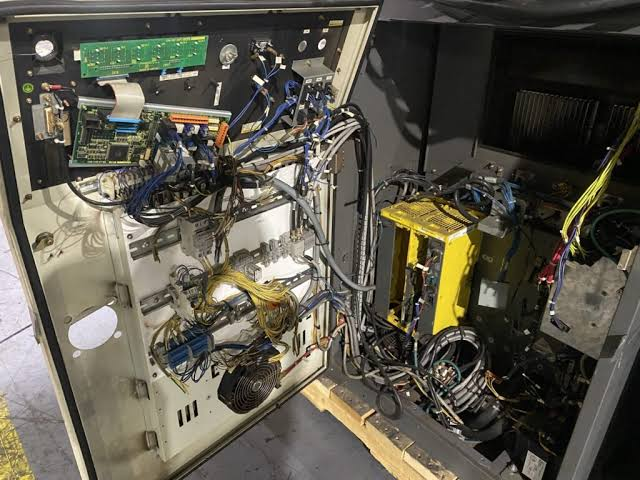
The filter pads in an industrial robot control cabinet are used to block dust, welding fumes, and oil mist from entering the cabinet, while the cooling fans are responsible for maintaining airflow and removing heat generated by the power supply modules, drives, and main computer. After filter pads become clogged or fan performance degrades, the control cabinet may experience temperature alarms, operational shutdowns, system restarts, and reduced lifespan of electronic components.
Recommended on-site maintenance intervals: In ordinary clean environments, inspect filter pads and fans every 1 to 3 months; in environments with welding fumes, metal dust, spray oil mist, or high temperatures, it is recommended to inspect every 2 to 4 weeks. Fans should be cleaned and their operation checked at least every six months, with a comprehensive inspection conducted annually as part of the robot's yearly maintenance. Specific intervals should be adjusted based on the control cabinet model, on-site contamination levels, and the equipment manual.
1. Why Filter Pads Need Regular Inspection
After being used for a period, filter pads gradually accumulate dust, fibers, welding fumes, and oil deposits on their surface. As filtration resistance increases, even if the fan is still spinning, the amount of air entering the control cabinet will significantly decrease. Heat generated by the power supply modules, drives, and main computer cannot be dissipated in time, easily leading to a continuous rise in cabinet temperature.
2. How Often to Inspect in Ordinary Environments
In workshops with stable temperatures, low dust levels, and good ventilation around the control cabinet, filter pad and fan inspections can be incorporated into monthly or quarterly checks. When initially establishing a schedule, it is recommended to observe monthly, then determine if the interval can be extended to two or three months based on the rate of filter pad contamination and changes in cabinet temperature.
3. Why to Shorten the Interval in Harsh Environments
Welding shop fumes, metal dust from grinding stations, oil mist in spray environments, and moisture in food processing areas can all cause filter pads to clog rapidly. In some sites, although surface dust may be minimal, oil mist mixed with dust can form sticky contamination that cannot be removed by ordinary blowing. In such environments, inspection every 2 to 4 weeks is recommended, with further shortening of the interval if contamination is severe.
4. When Should Filter Pads Be Replaced
Filter pads should be replaced directly when they are noticeably blackened, have surface caking, are saturated with oil, are damaged or deformed, or fail to restore air permeability after cleaning. If the filter material has aged and is shedding particles, it should also not be used further, as debris could be sucked into the control cabinet and adhere to circuit boards, heat sinks, and connector surfaces.
5. Can Filter Pads Be Washed and Reused?
Whether washing is possible depends on the filter material type. Filters labeled as washable can be cleaned as required, completely dried, and reinstalled. Ordinary fiber filter pads may deform, change density, and lose filtration performance after being washed with water. Filter pads saturated with oil mist or chemical contaminants are generally not suitable for continued use and should be replaced with new parts of the same specification.
6. What to Verify When Replacing Filter Pads
New filter pads should match the original part's length, width, thickness, material, and filtration rating. Density that is too low will allow excessive dust into the cabinet, while density that is too high will increase air intake resistance. During installation, also ensure the filter pad covers completely without edge gaps, and maintain the original air intake direction and mounting method.
7. How to Determine Fan Performance Degradation
Fan failure does not necessarily manifest as a complete stop. Bearing wear, blade dust accumulation, motor aging, and power supply abnormalities can all cause reduced speed. On-site judgment can be made based on fan sound, vibration, airflow output, and cabinet temperature trends. If the fan exhibits friction noise, periodic abnormal sounds, slow startup, speed fluctuations, or stops after running for a period, further inspection is needed.
8. Why High Temperature Occurs Even When the Fan is Spinning
Even if the fan is spinning, actual airflow may still be insufficient if the rotation direction is wrong, blades are dusty, the filter pad is clogged, the cooling path is blocked, or the intake/exhaust vents are too close to a wall. Improper cable routing inside the cabinet can also block cooling airflow for drives and power supply modules. Therefore, assessing fan status should not rely solely on whether the blades are turning; the complete air circulation path must be checked.
9. What Items Need to Be Measured During Fan Inspection
When inspecting fans, confirm that the supply voltage is stable, connectors are not loose, and there are no broken wires or poor contacts. Compare startup speed, operating sound, and airflow output with fans of the same model. For controllers with speed monitoring or fan alarm functions, relevant statuses and historical alarms should also be read to determine if intermittent stops have occurred.
10. What to Pay Attention to When Replacing Fans
Before replacing a fan, verify the rated voltage, current, dimensions, airflow, speed, connector type, and mounting hole positions, while also confirming the airflow direction matches the original configuration. Choosing a fan based solely on physical dimensions may lead to power mismatch, insufficient airflow, different connectors, or the controller failing to recognize it. After installation, also check for any friction between the blades and the protective grille.
11. How to Properly Clean the Control Cabinet
Before cleaning, follow the equipment maintenance procedure to stop the robot and disconnect the control cabinet power, waiting for relevant circuits to discharge. Filter pads and removable fans should be taken out and cleaned separately. Avoid blowing large amounts of compressed air directly into the control cabinet interior, as dust could enter drive modules, power supply units, and the main computer. After cleaning, check that no tools, screws, or cleaning materials are left inside the cabinet.
12. Which Faults May Be Related to Poor Cooling
Abnormal cooling in the control cabinet may cause temperature alarms, drive overheating, irregular system restarts, communication module going offline, teach pendant lagging, and the robot stopping after running for a period. If the fault does not occur during a cold start, becomes more frequent the longer it runs, and temporarily improves when the cabinet door is opened, focus on checking the filter pads, fans, cooling channels, and cabinet temperature.
13. How to Establish On-site Maintenance Intervals
During each inspection, record the filter pad color, dust accumulation level, fan sound, airflow output, and cabinet temperature. After recording continuously for three to six months, determine the actual maintenance interval based on the contamination rate. If filter pads become severely clogged every month, maintain a monthly or shorter interval; if they remain relatively clean after three months, the interval can be appropriately extended based on the equipment manual, but daily inspections should still be retained.
14. Post-Repair Cooling Verification
After replacing filter pads or fans, confirm that the fan starts normally, airflow direction is correct, intake/exhaust vents are not blocked, and observe if the controller still shows temperature or fan alarms. Then, have the robot run a full production cycle under normal load, comparing cabinet temperature, fan sound, and equipment stability before and after the repair to ensure overheating shutdowns or system restarts do not recur.
15. Summary
For robot control cabinets in ordinary clean environments, inspect filter pads and fans every 1 to 3 months; in environments with welding fumes, metal dust, spray oil mist, and high temperatures, inspection every 2 to 4 weeks is recommended. Fans should be cleaned and their operation checked at least every six months, with a comprehensive inspection conducted annually as part of the robot's yearly maintenance. Filter pads should be replaced promptly when clogged, saturated with oil, or damaged; fans should also be addressed quickly if abnormal sounds, reduced speed, or intermittent stops occur.
Repair Consultation
If you need to handle industrial robot control cabinet temperature alarms, fan stoppage, filter pad clogging, drive overheating, or repeated system restarts, please provide the robot brand, control cabinet model, complete alarm information, operating environment, and photos of the control cabinet interior.
Industrial Robot Repair Hotline: +86 18122009539
Contact Repair Engineer: +86 18122009539