
How to Set Up Robot Safety Zones and Soft Limits? Boundary Checks Before Commissioning
Robot safety zones and soft limits should be set by considering the mechanical range, fencing, personnel pathways, peripheral equipment, and stopping distance, and then verified through low-speed and automatic modes.
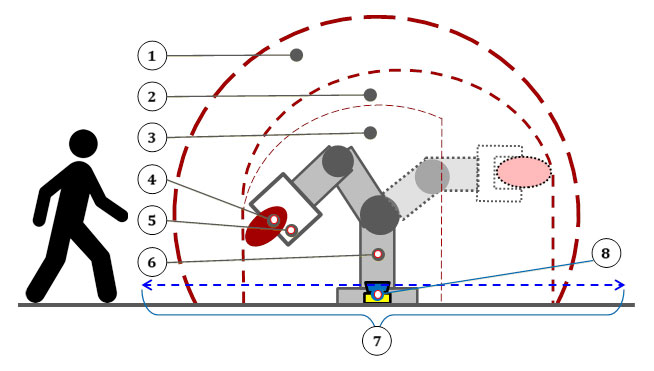
Soft limits and safety zones can reduce the risk of a robot entering hazardous spaces, but incorrect parameter settings may block normal trajectories or fail to correctly cover dangerous areas.
- Key Checks
- Clearly define the actual envelope range of the robot, tool, workpiece, and external axes under all operating conditions.
- Distinguish between ordinary software zones, axis soft limits, and certified safety monitoring functions.
- Consider the stopping distance during high-speed motion and the extension dimensions of the tool and workpiece.
- Verify the interlock relationships of safety doors, fencing, light curtains, emergency stops, and peripheral equipment.
- Processing Steps
- First, check the limit and zone boundary directions of each axis in low-speed manual mode.
- Perform boundary tests using representative tools, the largest workpiece, and extreme postures.
- Verify the signals and stopping behavior when entering, leaving, and staying in the zone, item by item.
- After modifications, save parameter backups, test records, and approved versions.
- Common Misconceptions
- Setting zones based only on the robot flange position, ignoring tool and workpiece dimensions.
- Using ordinary program judgments as safety functions.
- Failing to cover all speed and external axis conditions after modifying safety parameters.
- Summary
Robot safety zones and soft limits should be set by considering the mechanical range, fencing, personnel pathways, peripheral equipment, and stopping distance, and then verified through low-speed and automatic modes.
Industrial Robot Repair Hotline: +86 18122009539
Contact Repair Engineer: +86 18122009539