
ABB IRB 660 Palletizing Robot Inaccurate Gripping Repair: Troubleshooting Fixture Signals, Load, and Pallet Pattern Offset
When an ABB IRB 660 palletizing robot exhibits issues such as inaccurate gripping, offset placement of materials, fixture inaction, or progressive layer-by-layer skewing of the pallet pattern, the fault may originate from photoelectric sensors, vacuum or pneumatic fixtures, tool coordinates, load parameters, workpiece coordinates, revolution counters, or the mechanical structure itself. This article introduces troubleshooting methods for the IRB 660 palletizing system, including signal chain inspection, coordinate verification, and post-repair testing procedures.
In this article
ABB IRB 660 Palletizing Robot Grasping Inaccuracy Repair: Clamp Signal, Load, and Pallet Pattern Offset Troubleshooting
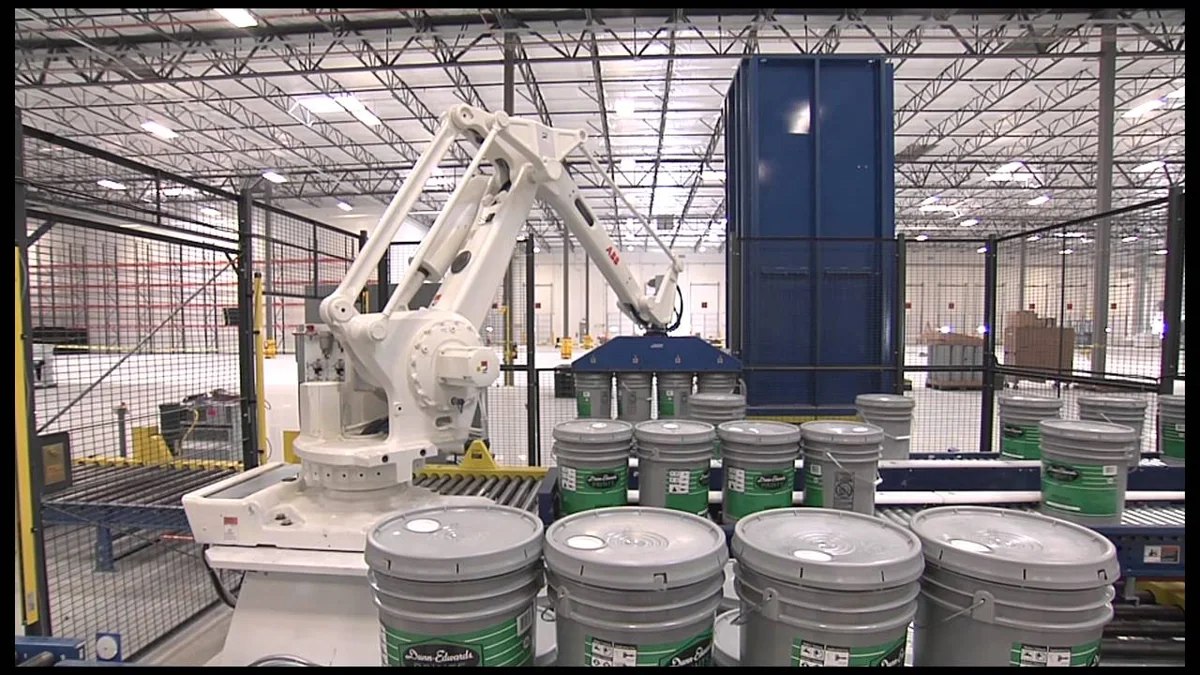
ABB IRB 660 is a four-axis palletizing robot commonly used for cartons, bagged materials, barrel products, and end-of-line handling. A complete palletizing system typically consists of the robot body, IRC5 controller, conveyor line, positioning mechanism, clamp, pallet detection device, PLC, and safety system.
When the robot experiences grasping inaccuracy or pallet pattern offset, the issue may not originate from the robot body itself. Inaccurate conveyor positioning, delayed sensor signals, clamp air leakage, tool coordinate changes, and pallet reference movement can all cause similar faults.
On-site Judgment Conclusions:
If all grasping points are offset simultaneously, first check the tool coordinates, robot zero point, and clamp installation. If only a specific product or a specific layer shows deviation, check the corresponding recipe, workpiece coordinates, and pallet pattern calculation. If the deviation gradually increases with production time, then check conveyor positioning, pallet reference, and mechanical looseness.
Scope of Application:
This article primarily applies to ABB IRB 660 palletizing robots configured with the IRC5 control system. Signal names and parameters differ among different clamps, PLC programs, and palletizing software. Specific settings should be based on the equipment program, electrical drawings, and corresponding technical manuals.
1. Palletizing Robot Grasping Process
A normal grasping and palletizing process typically includes:
- The conveyor line delivers the product to the grasping position.
- Positioning baffles or mechanisms secure the product.
- Sensors confirm the product is in place.
- The PLC sends a grasping permission signal to the robot.
- The robot moves to the grasping approach point.
- The robot reaches the grasping point.
- Vacuum suction cups or pneumatic clamps activate.
- Pressure or position sensors confirm successful grasping.
- The robot leaves the grasping area.
- The robot reaches the pallet placement position.
- The clamp releases the product.
- The PLC and robot update the pallet pattern layer count.
Any abnormality in a signal or position can cause grasping failure, product dropping, or pallet pattern offset.
2. Common Fault Manifestations
Common issues with the IRB 660 palletizing system include:
- The robot reaches near the product but fails to grasp it.
- The clamp has activated, but the product is not lifted.
- The product drops immediately after vacuum suction cup adsorption.
- Grasping is successful, but the placement position is offset.
- The first layer is normal, but subsequent layers gradually skew.
- Fixed deviation in a specific column or corner position.
- Collision occurs after changing product specifications.
- The entire pallet position changes after pallet replacement.
- Robot positioning becomes unstable after running for a period.
- Clamp signals are normal, but the robot does not execute the next action.
During repair, first distinguish between three types of problems: "incorrect product position," "clamp not gripping securely," and "robot coordinate offset."
3. Information to Record Before Repair
Before starting the inspection, record:
- Complete model and serial number of the ABB IRB 660.
- IRC5 controller and RobotWare version.
- Currently used product recipe.
- Product dimensions and weight.
- Clamp type and tool data.
- Pallet pattern, layer number, and position where the fault occurred.
- Robot alarm code and alarm text.
- PLC and robot I/O status.
- Whether the fault consistently occurs at the same point.
- Recent adjustments to the pallet, conveyor line, or clamp.
- Whether the robot has experienced a collision.
- Whether system and program backups are complete.
It is recommended to photograph the grasping point, placement point, clamp status, pallet position, and final pallet pattern to facilitate judging the deviation pattern.
4. Product In-Place Signal Check
Before the robot begins grasping, it typically needs to confirm the product has entered the fixed position.
Key inspection points include:
- Whether photoelectric sensors are obscured by dust.
- Whether sensor mounting positions have moved.
- Whether detection distance and sensitivity are correct.
- Whether positioning baffles are loose or worn.
- Whether the conveyor belt is slipping.
- Whether there are variations in product dimensions and shape.
- Whether the product in-place signal exhibits jitter.
- Whether the PLC signal is correctly transmitted to the IRC5.
If the PLC sends the grasping permission signal prematurely before the product has completely stopped, the robot may experience grasping position deviation.
5. Conveyor Line Positioning Error Troubleshooting
Unstable conveyor line positioning directly affects grasping accuracy.
Common causes include:
- Insufficient conveyor belt tension or slipping.
- Positioning cylinder not reaching its intended position.
- Loosening of the material blocking mechanism.
- Changes in product surface friction.
- Delay parameters not updated after conveyor speed adjustment.
- Abnormal encoder or tracking signal.
- Multiple products experiencing compression.
- Mechanical reference of the conveyor line has shifted.
You can continuously measure the actual positions of multiple products after they stop. If the product positions themselves are unstable, repair the conveyor line and positioning mechanism first; do not compensate by modifying robot program points.
6. Vacuum Suction Cup Grasping Faults
When using vacuum clamps, common problems include:
- Vacuum suction cup damage or aging.
- Dust adhering to the suction cup surface.
- Vacuum line air leakage or bending.
- Insufficient air supply to the vacuum generator.
- Filter clogging.
- Abnormal solenoid valve operation.
- Unreasonable vacuum pressure switch settings.
- Uneven product surface or presence of pores.
- Suction cup not making full contact with the product.
If the vacuum build-up time is too long, the robot may start moving before the product is securely held. Check the actual vacuum value, build-up time, and grasping confirmation signal.
7. Pneumatic Clamp Faults
When using gripper or clamping-type tools, check:
- Whether the air supply pressure is stable.
- Whether the clamping and releasing solenoid valves are normal.
- Whether the cylinder is leaking air.
- Whether guides and linkages are sticking.
- Whether the gripper position sensor is reliable.
- Whether the clamping force meets the product weight requirements.
- Whether the gripper has experienced wear or deformation.
- Whether the product dimensions match the recipe.
- Whether the gripper opening/closing time is reasonable.
If the gripper action is complete but the feedback signal has not returned, the robot program may wait indefinitely. In this case, both the mechanical action and sensor status should be checked simultaneously.
8. Gripper signal normal but robot does not move
When this occurs, the complete program interlock conditions should be checked.
Common inspection items include:
- Whether the robot is in automatic mode.
- Whether the motor is already powered on.
- Whether the PLC has sent a start permit.
- Whether the product-in-position signal is maintained.
- Whether the gripper open or close signal is correct.
- Whether the pallet is in position.
- Whether the safety door and light curtain are normal.
- Whether the program pointer is at the correct position.
- Whether there are any unsatisfied wait signals.
- Whether the robot is waiting for other stations.
Do not observe only one gripper signal. Based on the program execution position, confirm whether all preconditions are simultaneously satisfied.
9. Judgment of tool coordinate offset
After gripper collision, bolt loosening, or reinstallation, the Tool Center Point (TCP) may change.
Abnormal tool coordinates are typically manifested as:
- All pick and place positions offset simultaneously.
- Deviation direction changes with robot posture.
- One side of the gripper contacts the product first.
- The same program shows different errors in different postures.
- TCP checkpoints cannot accurately coincide.
During inspection, confirm:
- Whether the gripper mounting flange is loose.
- Whether the gripper structure is deformed.
- Whether the tool data has been modified.
- Whether the TCP matches the actual gripping center.
- Whether the tool orientation is correct.
- Whether recalibration was performed after gripper replacement.
If a mechanical change occurs to the tool, do not only adjust a single pick point; first reconfirm the tool coordinates.
10. Workpiece coordinate and pallet reference check
Palletizing positions are usually calculated based on pallet or station coordinates. If the pallet reference changes, the entire stack of products will shift uniformly.
Inspection content includes:
- Whether the pallet is placed in position.
- Whether the pallet limit blocks are loose.
- Whether the pallet dimensions are consistent.
- Whether the workpiece coordinates have been modified.
- Whether the station reference point is accurate.
- Whether the external measurement sensor is normal.
- Whether the pallet detection signal is reliable.
- Whether the left/right station recipe is selected correctly.
If all positions on the entire pallet shift in roughly the same direction and distance, priority should be given to checking pallet positioning and workpiece coordinates.
11. Why does the stack pattern skew layer by layer?
If the first layer is normal and subsequent layers gradually shift, it is usually related to stack pattern calculation or actual product dimensions.
Common causes include:
- Product dimension parameters do not match reality.
- Layer height setting is incorrect.
- Box height changes after compression.
- Calculation error for the offset between layers.
- The stacking program uses an incorrect reference point.
- Products slide after placement.
- Pallet surface is uneven.
- Gripper pushes the product upon release.
- Placement height is too high.
Measure the actual length, width, and height of the product separately and compare them with recipe parameters. Minor single-layer errors can accumulate, leading to noticeable offset at higher layers.
12. Judgment of individual position deviation
If only a specific column, corner, or layer is consistently offset, check:
- The program data corresponding to that position.
- Stack pattern index calculation.
- Product rotation angle.
- Gripper deformation in that posture.
- Placement approach and departure points.
- Whether surrounding products are causing compression.
- Whether the robot is near axis limits or singularities.
- Whether external interference exists at that location.
For fixed-position faults, modifying the entire tool coordinate is usually unnecessary; first check the corresponding stack pattern data and local trajectory.
13. Load data and robot motion
ABB IRC5 calculates motion control parameters based on the weight, center of gravity, and inertia of the tool and workpiece.
Incorrect load data may cause:
- Jerking during acceleration and deceleration.
- Unstable robot positioning.
- Overload alarms after gripping the product.
- Tool posture deviation during the placement process.
- Increased servo motor temperature.
- Following errors when operating speed is increased.
During inspection, distinguish between the empty gripper load and the actual load after gripping the product. After product specifications change, update the corresponding load data accordingly.
14. Robot zero point and mechanical condition check
If all program points are uniformly offset while tool and workpiece coordinates are normal, check the robot zero point and mechanical structure.
Key points include:
- Whether the mechanical marks on each axis correspond.
- Whether the revolution counter status is normal.
- Whether the robot has experienced a collision.
- Whether the motor or reducer has been disassembled.
- Whether the base bolts are loose.
- Whether the robot base has shifted.
- Whether mechanical backlash exists in the reducer.
- Whether there is clearance in bearings and flanges.
Do not mask robot zero point or mechanical deviations by batch-modifying program points.
15. Palletizing system I/O check
Common signals in palletizing systems include:
- Product in position.
- Gripping permit.
- Pallet in position.
- Gripper open.
- Gripper closed.
- Vacuum established.
- Product gripping successful.
- Station selection.
- Recipe number.
- Palletizing complete.
- Conveyor line start permit.
- System fault and reset.
During inspection, simultaneously view the I/O status of both the PLC and IRC5 to confirm signals are correctly sent, received, and maintained.
16. Gripping not in position repair process
Step 1: Record the product, stack pattern, layer number, and position where the fault occurred.
Step 2: Check the product-in-position sensor and conveyor line positioning.
Step 3: Check the vacuum or pneumatic gripper action.
Step 4: Check the gripping successful feedback signal.
Step 5: Confirm tool installation and TCP.
Step 6: Confirm pallet position and workpiece coordinates.
Step 7: Check product dimensions and stacking pattern parameters.
Step 8: Check robot load data.
Step 9: Check zero point, base, and mechanical backlash.
Step 10: After fault repair, complete no-load, load-bearing, and full-stack tests.
17. Post-repair restart verification
After completing the repair, the following should be performed in sequence:
- Confirm sensor and positioning mechanism status.
- Continuously test gripper opening and closing.
- Check vacuum or air pressure build-up time.
- Verify product in-position and successful gripping signals.
- Run gripping and placing trajectories at low speed.
- Check TCP and pallet reference.
- Perform pick-and-place tests using a single product.
- Continuously test all positions on the same layer.
- Test different layers and different product orientations.
- Complete stacking of a full pallet.
- Measure stack dimensions and verticality.
- Gradually restore to normal operating speed.
Only when the full pallet runs continuously and stably can the palletizing system be confirmed as restored to normal.
18. Common Issues
Is the robot always gripping off-target due to a robot zero point issue?
Not necessarily. First, check product positioning, gripper TCP, and conveyor line status. If all positions are offset simultaneously, then check the zero point and workpiece coordinates.
Why is the first layer normal, but it becomes more offset the higher it goes?
This is usually related to product height, inter-layer offset, stacking pattern calculation, or product slippage.
What to do if the gripper signal is normal but the program does not continue running?
Check all conditions the program is currently waiting for, including product in-position, gripper feedback, pallet status, and safety signals.
What needs to be done after replacing the gripper?
It is necessary to verify tool weight, center of gravity, inertia, and TCP, and re-validate gripping and placing positions.
19. Daily Maintenance Recommendations
- Regularly clean product detection sensors.
- Check conveyor line positioning stops and cylinders.
- Check suction cups, air hoses, and vacuum filters.
- Check gripper bolts and tool flange.
- Update recipes and load data after product specification changes.
- Regularly verify TCP and pallet reference.
- Check zero point and gripper structure after a robot collision.
- Save backups of the system, programs, and stacking pattern parameters.
20. Summary
When an ABB IRB 660 palletizing robot experiences issues with inaccurate gripping or stacking pattern offset, troubleshooting should follow the order: "Product Positioning — Gripper Action — I/O Signals — Tool Coordinates — Pallet Reference — Stacking Pattern Parameters — Robot Zero Point."
For single-piece gripping deviation, focus on checking conveyor positioning and the gripper; for whole-stack overall offset, check TCP and pallet coordinates; for cumulative deviation layer by layer, check product dimensions and stacking pattern calculations.
Technical content reference: ABB IRB 660, IRC5 control system technical documentation, and on-site industrial palletizing robot repair experience.
Repair Consultation
For repair of ABB IRB 660 palletizing robots, grippers, conveyor positioning, or stacking pattern offset faults, please provide the robot model, IRC5 controller version, gripper type, I/O status, fault location, and operation video.
Industrial Robot Repair Hotline: +86 18122009539
Contact Repair Engineer: +86 18122009539
Need a part or repair assessment?
Share the robot model, part number, fault details and destination country with our team.
Contact our team ↗